

Justice Desk (JD)
Clear procedural paths
within court systems
Structured explanation of legal processes that helps individuals and institutions understand how cases move, without influencing decisions or outcomes.
Reality
How courts work in real conditions
Courts operate through defined procedures, records, and formal processes. Every case is expected to move through structured steps, supported by documentation and institutional handling.
In real conditions, these systems carry heavy load. A small number of staff handle large volumes of cases, records move across desks, and access to information often depends on timing, availability, and coordination within the system.
For users, this creates a different experience. Information is not always immediately visible. Case progress can be difficult to follow. Getting a simple update, document, or copy may require multiple steps, visits, or follow-ups.
The challenge is not the absence of process, but the difficulty of accessing and navigating it when needed.
Where pressure builds
Case records are handled through physical and administrative flows. Movement between filing, record rooms, and courtrooms introduces delay and dependency. Reconstructing case history can take effort. Certified copies require process, verification, and time.
Visibility remains limited at the point where people need it most, when they are trying to understand what is happening in their case, what comes next, or how to proceed.
Justice Desk (JD) is designed in response to these conditions, by making records, process, and access structured, visible, and immediately available within the system itself.
System
What Justice Desk (JD) does
Justice Desk (JD) is a structured access system that makes court processes, case information, and procedural steps directly visible and navigable.
It does not change how courts operate. It does not alter procedures, roles, or authority. Instead, It reorganizes how information is accessed, so that what already exists within the system becomes clear, searchable, and immediately usable.
Through JD, individuals, lawyers, and court staff can access case records, track progress, obtain documents, and understand procedural pathways without depending on fragmented or manual access points.
The system works as a single structured layer across the court environment — connecting records, processes, and access into one continuous, visible flow.
One system, multiple access points
JD operates both outside and inside the court environment. Outside, it provides public-facing access to case information, documents, and procedural understanding. Inside, it supports structured handling of records, filings, and court workflows under institutional control.
In this form, JD does not introduce a new process, it makes the existing process visible, structured, and accessible at the point where it is needed.
Access
Access outside the court
Outside the courtroom, JD provides a direct and structured way to access case information, procedural steps, and court-related services without relying on fragmented or manual pathways.
It brings together records, listings, and access points into a single interface where information can be searched, filtered, and understood in real time.
Case search and visibility
Cases can be searched through multiple entry points, including case number, title, party name, or area. Results are structured and filterable, allowing users to quickly identify relevant records even in large volumes.
For example, a user can search by name and view all related cases, refine results by type, and understand their current status without navigating multiple offices or records manually.
Cause lists and scheduling
JD provides access to daily cause lists with clear time-based structure. Users can view which cases are listed, where they are scheduled, and under which court or judge, reducing uncertainty around timing and appearance.
Court structure and jurisdiction
The system presents a clear view of court structure, including judges, courtrooms, and their respective jurisdictions such as assigned areas or police stations in relevant case types. This helps users understand where a matter belongs and how it is distributed across the system.
Lawyer discovery and transparency
JD provides a structured directory of legal professionals, allowing users to filter by domain, experience, and activity. Visibility is based on actual case participation and procedural engagement rather than static listings.
This creates a clearer picture of who is actively handling cases, helping users make more informed choices when selecting representation.
Document access and certified copies
Users can request and obtain case-related documents directly through the system. This includes standard copies as well as certified true copies, generated with verifiable identifiers such as QR-based validation.
The process reduces repeated visits and uncertainty by providing a defined, trackable path for document access.
Forms and procedural requirements
JD provides access to relevant forms, filing formats, and procedural requirements used within courts. Where applicable, users can generate or prepare documents in alignment with official formats before entering the formal process.
Support for individuals without representation
For individuals handling minor matters or seeking initial clarity, JD provides structured guidance on procedural options and available support pathways, including access to pro bono or public legal aid where available.
In this environment, JD reduces the distance between people and the system, making information visible, access direct, and processes easier to approach before entering the courtroom itself.
In this environment, JD reduces the distance between people and the system, turning access into a direct, structured interaction rather than a multi-step process.
Courtroom
Inside the court: structured record flow
Within the courtroom, JD operates as a structured record system that organizes how cases are created, handled, and preserved over time. It does not change court procedure, it brings structure and visibility to how records move through it.
Case creation and digital identity
When a case is registered, a master file is created and assigned a unique digital asset number. This identity remains attached to the case throughout its lifecycle.
A secure QR marker is applied to the case file, linking physical records with their digital counterpart. This connection forms the basis of traceability across all stages.
Capture at the point of action
Court proceedings are captured directly at the point where they occur. When a file is opened, an overhead capture system reads the QR marker and records the proceeding in real time.
This removes the need for later reconstruction. Each step is recorded as it happens, preserving continuity and reducing dependency on manual handling.
Continuous case record
All proceedings, filings, and updates are linked to the same master file. The case evolves as a continuous record rather than a set of disconnected entries.
This allows any authorized user to understand the full history of a case without piecing together information from multiple sources.
Judge access and case recall
When required, JD provides structured access to previous proceedings, including recorded context and prior steps. This allows judges to quickly align with the current state of a case without relying on fragmented notes or memory.
Where enabled, the system can also present relevant legal references to support review, always under the direction and discretion of the court.
Finalization and archive discipline
Once a case is concluded, the master file is finalized and preserved as part of the official record. Physical records remain secured, while the digital record ensures long-term accessibility and reference without repeated handling.
Controlled record movement
Movement of records within the system follows defined pathways. Each interaction is linked to the case identity, ensuring that handling remains structured, traceable, and consistent across environments.
In this structure, JD transforms how records are handled inside the court, not by changing legal process, but by ensuring that every step is captured, connected, and immediately available as part of a continuous case record.
Flow
From filing to archive: a continuous case flow
JD connects all stages of a case into a single continuous flow, from initial filing to final archive, ensuring that each step remains visible, structured, and linked to the same record.
1. Case entry
A case is registered and assigned a master file with a unique digital asset number. A QR marker connects the physical file with its digital identity from the beginning.
2. Filing and preparation
Documents, forms, and initial submissions are attached to the case record. All materials are structured under the same identity, removing fragmentation at the point of entry.
3. Court proceedings
Each hearing is captured at the moment it occurs. When the file is opened, the system links the proceeding to the case through its QR identity, creating a real-time record of events.
4. Continuous updates
Every action, filings, orders, and procedural steps, becomes part of the same evolving record. The case develops as a single continuous timeline rather than separate entries across locations.
5. Access and reference
Authorized users can access the full case history at any point. Previous proceedings, documents, and context are available without reconstruction, allowing clear understanding of the current stage.
6. Decision and finalization
When a case is concluded, the outcome and final documents are attached to the master record, completing the procedural chain under the same identity.
7. Archive and preservation
The case moves into structured archive. Physical records remain secured, while the digital record preserves full history for future reference without repeated handling or retrieval delays.
In this model, a case is no longer a collection of scattered documents, it becomes a continuous, traceable record that remains complete and accessible from start to finish.
Architecture
How JD is structured
The Justice Desk operates through a layered structure where interaction, coordination, interpretation, and institutional authority remain clearly separated. This diagram provides a conceptual view of how these layers connect in practice.
View system diagram
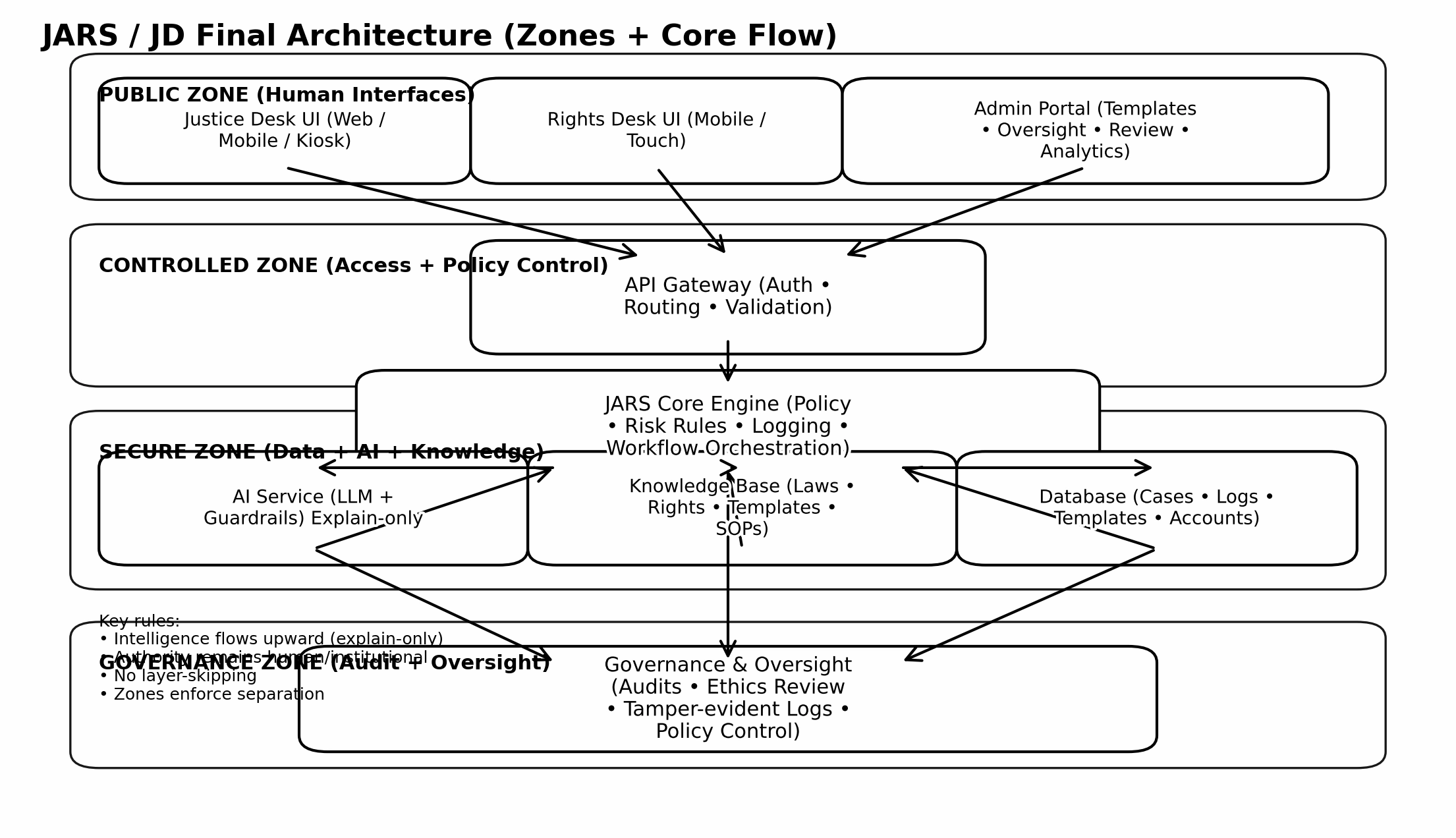
Conceptual illustration of the Justice Desk architecture, showing the separation between user interaction Intelligent Civic Interface (ICI), input coordination (JINS), interpretive support (NAVI), and institutional authority. This diagram is explanatory and non-operational.
Interaction enters through structured interfaces, is coordinated and validated before processing, interpreted within bounded system layers, and presented through JD - while authority remains fully with courts and institutions.
Coordination
Input structuring & system routing
Between user interaction and system processing, a coordination layer structures how inputs enter the system. This layer, Justice Information Network System (JINS), ensures that requests are validated, normalized, and aligned with procedural boundaries before any processing occurs.
JINS does not generate responses. Its role is to control how requests are handled — enforcing boundaries, maintaining consistency, and ensuring that only valid, non-decision queries proceed further.
All interactions pass through this layer, preventing uncontrolled input and ensuring that system behavior remains predictable and institutionally aligned.
By structuring input before interpretation, JINS maintains a clear separation between user interaction, system explanation, and institutional authority.
This coordination layer ensures that JD operates consistently across environments while remaining bounded within lawful and procedural limits.
Interpretation
Structured explanation without decision-making
The Justice Desk (JD) presents structured procedural information to users. Behind this interface, an internal layer, Natural Adaptive Virtual Intelligence (NAVI), supports explanation by organizing terminology, clarifying context, and translating procedural structures into understandable form.
NAVI does not make decisions, provide recommendations, or influence outcomes. Its role is limited to interpretation — ensuring that procedural information is presented clearly and consistently.
All outputs remain informational and bounded. NAVI does not operate independently, and it cannot initiate actions or extend beyond the scope of a request.
This design ensures that explanation remains separate from authority. Courts, legal professionals, and institutions retain full responsibility for all decisions, actions, and outcomes.
In this structure, NAVI supports understanding — while authority remains entirely with the institutions that administer justice.
Roles
Roles and human interaction
JD is designed to operate within existing court environments, supporting the people who already carry the system. It does not replace roles, it structures how they interact with records, processes, and access.
Court staff and record handlers
Clerks, record keepers, and supporting staff operate as primary system users within the court. Through structured interfaces, they manage case records, access information, and navigate workflows without relying on fragmented or manual coordination.
In JD, these roles are supported as trained operators (KPOs), enabling consistent handling of records while reducing pressure from repetitive or unstructured tasks.
Judges and court authority
Judges remain the sole authority over proceedings, decisions, and legal outcomes. JD does not influence judgment. It supports access to structured case history, prior proceedings, and relevant references when required, under judicial control.
Lawyers and legal professionals
Lawyers continue to represent, argue, and guide cases within the court. JD strengthens their ability to access records, track proceedings, and manage case information with greater clarity and consistency.
Visibility into actual case participation allows a clearer view of professional activity, supporting more transparent engagement between lawyers and the people they represent.
Bar councils and professional bodies
Bar councils remain central to the professional ecosystem. JD operates with full respect for their role in licensing, representation standards, and professional oversight.
Where applicable, bar councils can participate as stakeholders in defining criteria, reviewing system behavior, and supporting fair representation visibility across the system.
Public users and individuals
Individuals interact with JD to understand their cases, access documents, and navigate procedures before and during engagement with the court system.
For those without representation, JD provides structured guidance and access to available support pathways, helping users approach the system with clarity rather than uncertainty.
In this structure, JD strengthens how people interact with the system — making roles clearer, access more direct, and processes easier to manage, while keeping authority and responsibility fully with the institutions and professionals who carry them.
Safeguards
System safeguards & operational reliability
JD is designed for real court environments, where systems must remain reliable under pressure, variation, and everyday operational conditions. Its safeguards are built into structure, not added as external controls.
Traceable records
Every interaction with a case, whether access, update, or movement, is recorded in a structured and traceable way. This ensures that activity remains visible over time without depending on memory or informal tracking.
Controlled access
Access to records is role-based and limited to authorized users. Each role interacts with the system within defined boundaries, ensuring that information is available where needed while remaining appropriately contained.
Layered verification
Actions are not dependent on a single step or single user. Multiple checkpoints and confirmations ensure that changes and movements follow expected pathways and remain consistent with procedural flow.
Offline and online continuity
JD is designed to operate in both connected and controlled offline environments. This ensures continuity in courts where connectivity may vary, while maintaining structured synchronization and record consistency across systems.
Bounded system behavior
The system does not act independently. It responds only to direct interaction and remains limited to the scope of each request, ensuring predictable and controlled behavior at all times.
Support for institutional oversight
JD supports review and oversight by making activity observable and consistent. It does not replace institutional supervision, but strengthens it by providing clear, structured visibility into how processes are handled.
Together, these safeguards ensure that JD remains stable, reliable, and aligned with court environments, supporting daily operations without disrupting how institutions function.
The structure, safeguards, and operational behavior outlined here are further detailed in the core JD documents, alongside supporting research and the broader ARMI whitepaper library below.
Documentation
Justice Desk documents & references
The Justice Desk is supported by a set of working documents that describe how it operates in real environments, including process flow, system behavior, role boundaries, and deployment structure.
These materials are designed for institutional use, review, and implementation, providing a clear reference for how JD fits within court systems and public justice environments.

JD Operational Model
End-to-end process flow, interaction structure, and system behavior across real court environments.

JD System Design & Safeguards
Structural design, role separation, operational boundaries, and safeguards for controlled use within institutions.

Full Document Library
Browse all official JARS and ARMI documents, including deployment, system, and framework materials.
EXPLORE →
Research & Analysis
Access supporting research, evaluations, and analytical work related to public systems and justice infrastructure.
EXPLORE →Together, these documents provide a clear and structured reference for how the Justice Desk operates in practice, how it aligns with institutional roles, and how it can be introduced within real justice environments.
Closing
A working layer within court systems
JD is positioned as a practical support layer within court environments — helping structure how cases are accessed, understood, and moved through procedural pathways.
Its role is simple: bring clarity to process, consistency to handling, and visibility to movement, without changing how decisions are made or where authority belongs.
It works alongside existing roles, clerks, registries, legal professionals, and court staff, supporting daily operations without replacing institutional function.
By aligning with real workflows rather than abstract models, JD fits naturally into court environments, strengthening how systems are used rather than redefining them.
In this form, JD contributes quietly but consistently, improving how cases are handled, how processes are followed, and how individuals engage with the justice system over time.